

The newest Nano Banana
Nano Banana 2.1 is the newest member of Google’s Nano Banana family, alongside Nano Banana 2, Nano Banana Pro, Nano Banana, and Nano Banana - Lite. It’s available in both Create and Edit.When to use Nano Banana 2.1
Best for- Everyday image generation and editing when you want high quality without picking a specialist model.
- Combining several reference images, such as products or characters, into one consistent scene.
- Banners and strips in extreme aspect ratios, from 8:1 to 1:8.
- You need small or dense text, like labels, menus, or fine print. Use GPT Image 2.5 Sunburst.
- You need an editable SVG logo or icon. Use Recraft v4.
- Typography is the main element of the design. Use Ideogram v3.
Capabilities
Up to 4K output
Choose 1K, 2K, or 4K in the settings panel.
Extreme aspect ratios
Generate panoramic banners at 8:1 or 4:1 and tall strips at 1:4 or 1:8, plus all standard ratios.
Create and edit
Use the same model for new images in Create and for changes to existing images in Edit.
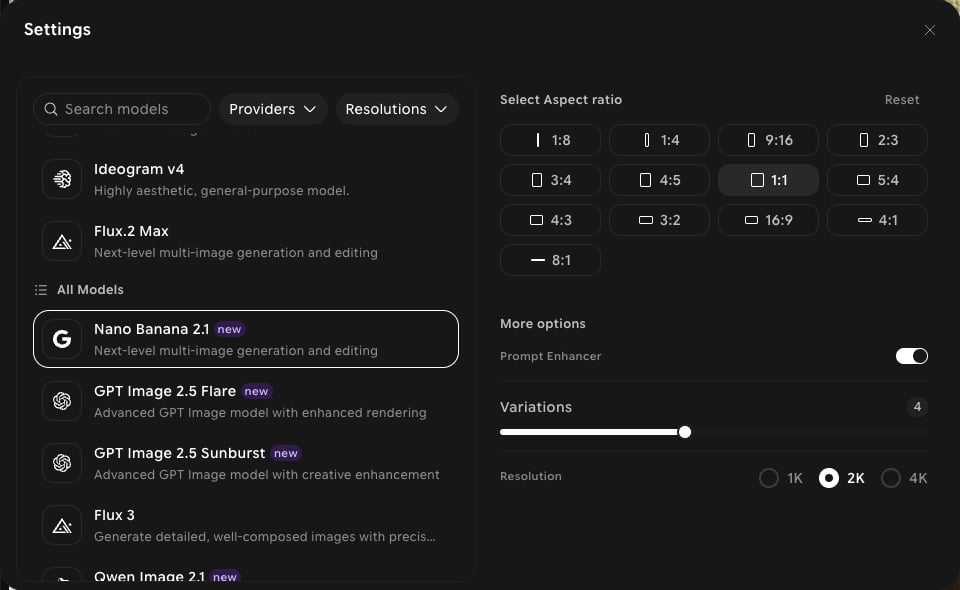
Settings in ImagineArt
How to use
1
Open Image Studio
In the sidebar, click Image. Make sure the Create tab is selected in the prompt bar.
2
Select the model
Click the model button in the prompt bar (it shows the current model and aspect ratio) to open Settings, then choose Nano Banana 2.1.
3
Set your aspect ratio and resolution
Choose an aspect ratio, then pick 1K, 2K, or 4K under Resolution.
4
Write your prompt
Describe your subject, setting, and style. Click Add references to guide the result with your own images.
5
Generate
Click Generate and review the output.