> ## Documentation Index
> Fetch the complete documentation index at: https://docs.imagine.art/llms.txt
> Use this file to discover all available pages before exploring further.
# What is ImagineBusiness?
> Workflows, built for teams — brand governance, shared assets, and pre-built templates layered on top of the same node-based canvas.
**ImagineBusiness** is a team workspace built on top of Workflows' node-based canvas — same underlying builder, with a governance and collaboration layer for teams working together on brand-consistent content.
## Switching into it
ImagineBusiness isn't a separate URL you navigate to directly — it's a **workspace** you switch into from the workspace switcher (top-left, where your personal workspace normally shows). Once switched, every page lives under a distinct `/enterprise/*` area of the app.
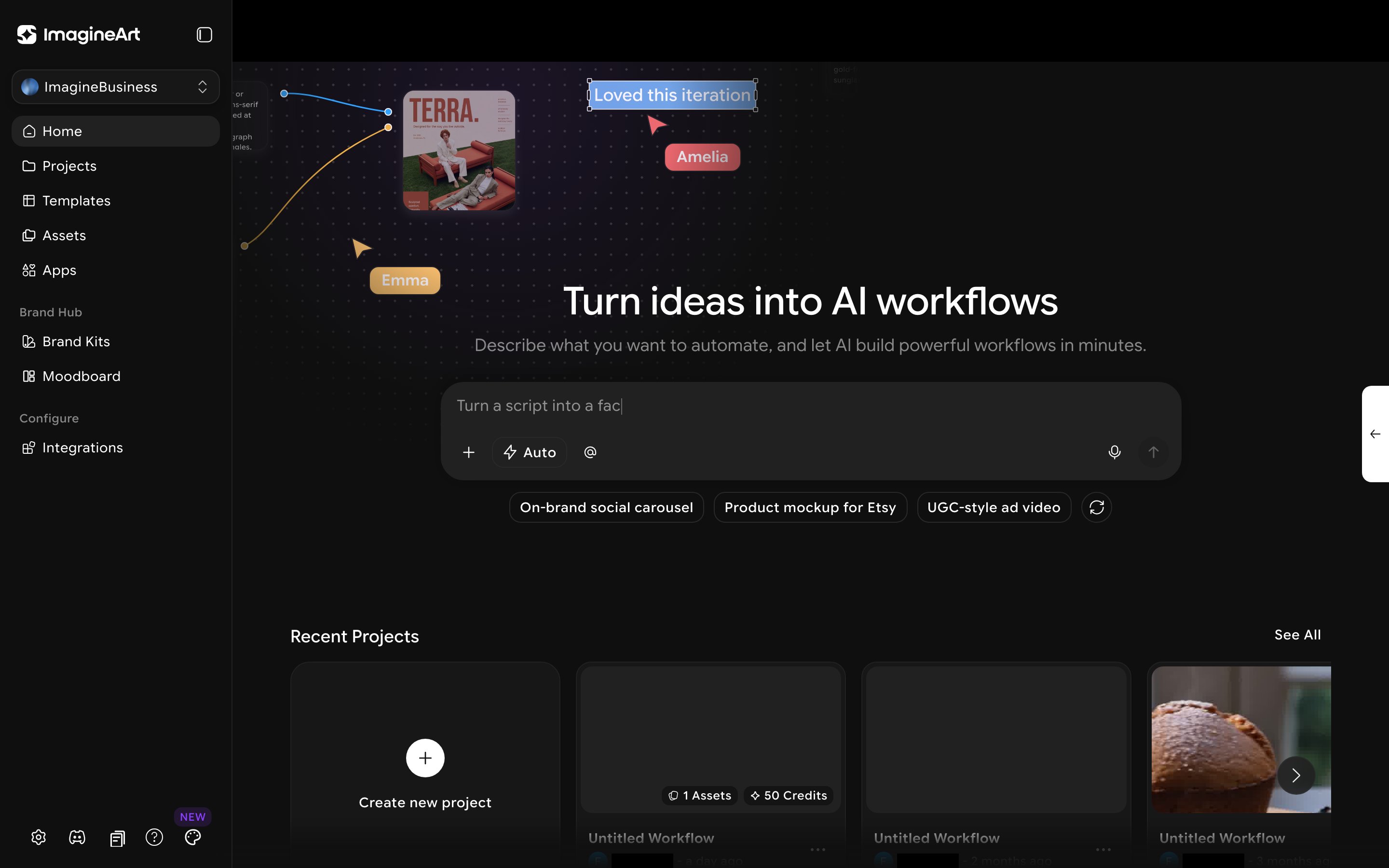 The sidebar adds several sections not present in personal Workflows:
* **Home** — a dashboard with an AI workflow generator and your team's recent projects. See below.
* **Projects** — the same node-based workflow canvas you'd use in regular Workflows.
* **Templates** — a searchable gallery of pre-built workflows to start from instead of building a canvas from scratch.
* **Assets** — a shared team asset library.
* **Apps** — Team Apps, My Apps, and Community Apps: ready-to-run apps powered by your workflows.
* **Brand Hub** — Brand Kits and Moodboards, covered on their own page: [The Brand Hub](/workflows/imaginebusiness-brand-hub).
* **Configure → Integrations** — connect third-party tools.
ImagineBusiness is a paid tier — "Contact Sales" and "Upgrade" prompts appear throughout, and clicking **Upgrade** opens a real pricing modal (a Teams Scale tier at \$350/mo alongside a custom Enterprise plan). Core functionality (Projects, Templates, Assets, Brand Hub) is fully usable once you're on it; a handful of integrations are still "Coming Soon."
## Home
The **Home** page is the landing screen when you switch into ImagineBusiness — a prompt box ("Turn ideas into AI workflows... Describe what you want to automate...") with suggestion chips (for example, "On-brand social carousel," "Product mockup for Etsy," "UGC-style ad video") for generating a starter workflow from a plain-language description, plus a **Recent Projects** grid below it.
## The top bar
Every ImagineBusiness page shares the same top bar, none of it specific to any one section:
| Element | What it does |
| - | - |
| Scope dropdown ("All team creations") | Filters what you see across the workspace |
| Team switcher pill | Shows member roles and seat counts, with **Invite** and any pending **New joiner requests** — real team/role management, not just a label |
| Grid icon | Opens a **Featured tools** quick-launch panel (Image, Video, Audio, Workflow, Edit, Upscale, Assist, AI Docs, Slides) |
| Account menu | Total Credits balance, Buy Credits, Usage Analytics, Appearance, Billing & Subscription, Settings, Logout |
## Templates
Click **Templates** for a searchable gallery of pre-built workflows. Each template is a real, ready-to-run workflow — not just an example.
The sidebar adds several sections not present in personal Workflows:
* **Home** — a dashboard with an AI workflow generator and your team's recent projects. See below.
* **Projects** — the same node-based workflow canvas you'd use in regular Workflows.
* **Templates** — a searchable gallery of pre-built workflows to start from instead of building a canvas from scratch.
* **Assets** — a shared team asset library.
* **Apps** — Team Apps, My Apps, and Community Apps: ready-to-run apps powered by your workflows.
* **Brand Hub** — Brand Kits and Moodboards, covered on their own page: [The Brand Hub](/workflows/imaginebusiness-brand-hub).
* **Configure → Integrations** — connect third-party tools.
ImagineBusiness is a paid tier — "Contact Sales" and "Upgrade" prompts appear throughout, and clicking **Upgrade** opens a real pricing modal (a Teams Scale tier at \$350/mo alongside a custom Enterprise plan). Core functionality (Projects, Templates, Assets, Brand Hub) is fully usable once you're on it; a handful of integrations are still "Coming Soon."
## Home
The **Home** page is the landing screen when you switch into ImagineBusiness — a prompt box ("Turn ideas into AI workflows... Describe what you want to automate...") with suggestion chips (for example, "On-brand social carousel," "Product mockup for Etsy," "UGC-style ad video") for generating a starter workflow from a plain-language description, plus a **Recent Projects** grid below it.
## The top bar
Every ImagineBusiness page shares the same top bar, none of it specific to any one section:
| Element | What it does |
| - | - |
| Scope dropdown ("All team creations") | Filters what you see across the workspace |
| Team switcher pill | Shows member roles and seat counts, with **Invite** and any pending **New joiner requests** — real team/role management, not just a label |
| Grid icon | Opens a **Featured tools** quick-launch panel (Image, Video, Audio, Workflow, Edit, Upscale, Assist, AI Docs, Slides) |
| Account menu | Total Credits balance, Buy Credits, Usage Analytics, Appearance, Billing & Subscription, Settings, Logout |
## Templates
Click **Templates** for a searchable gallery of pre-built workflows. Each template is a real, ready-to-run workflow — not just an example.
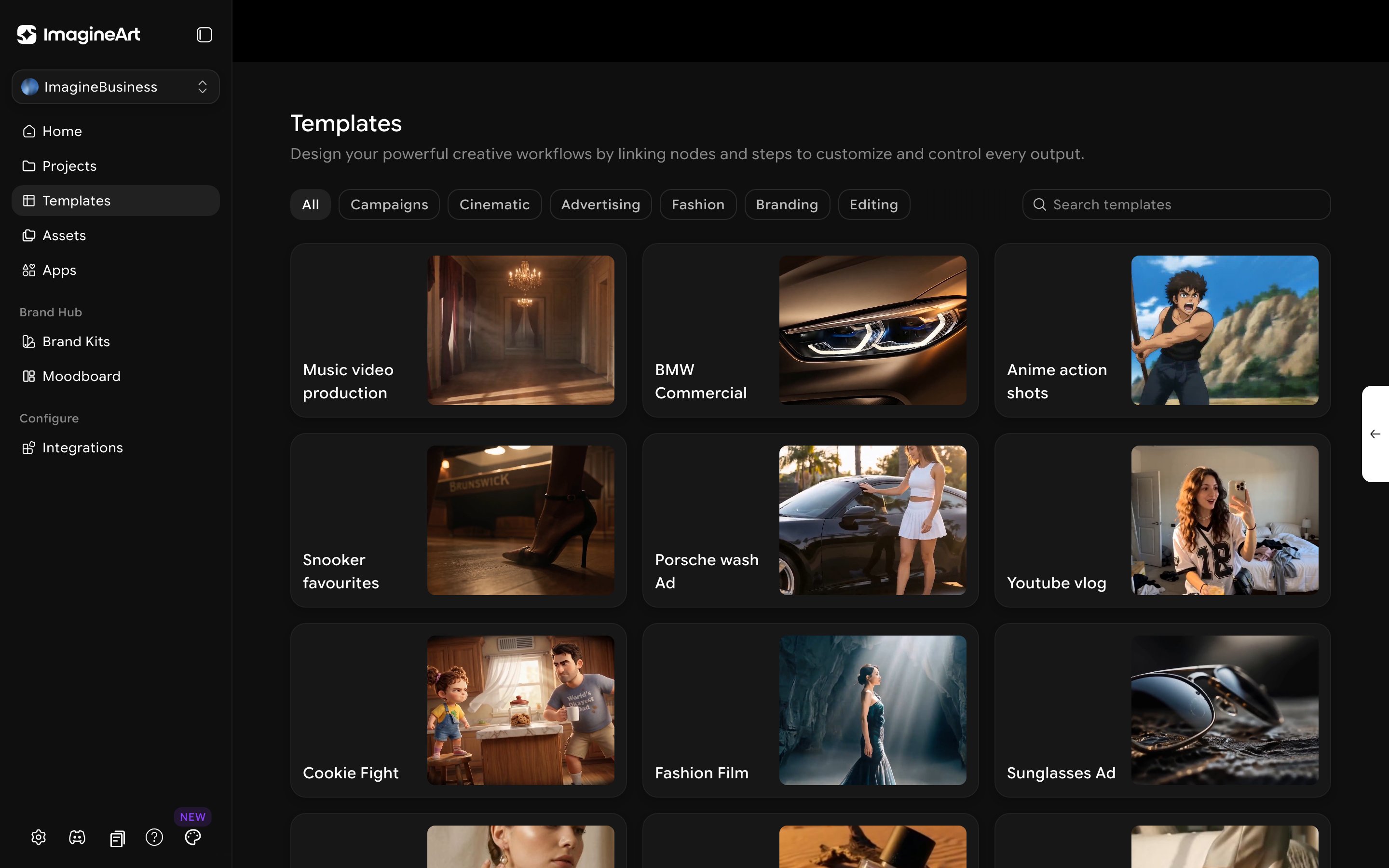 The category filter chips are **not fixed** — confirmed live across two sessions on the same team, the set changed from Campaigns/Cinematic/Advertising/Fashion/Branding/Editing to All/Cinematic/Advertising/**Fashion & Apparel**/Branding/**FMCG**/**Fast Food**/Editing. Treat any specific category list (including this page's) as illustrative, not exhaustive — expect it to drift.
## Assets
Click **Assets** for the team's shared library. Beyond a simple grid, assets carry real status tracking — **All / To Do / In Progress / Under Review / Done** — and are organized into **Team folders** (shared, e.g. "All public creations") and **Private folders** you create yourself. Saved views for **Liked**, **Uploads**, and **Recently Deleted** sit alongside the status pipeline, plus a multi-select **Filters** accordion, an Upload button, a grid/list toggle, and a zoom slider.
The category filter chips are **not fixed** — confirmed live across two sessions on the same team, the set changed from Campaigns/Cinematic/Advertising/Fashion/Branding/Editing to All/Cinematic/Advertising/**Fashion & Apparel**/Branding/**FMCG**/**Fast Food**/Editing. Treat any specific category list (including this page's) as illustrative, not exhaustive — expect it to drift.
## Assets
Click **Assets** for the team's shared library. Beyond a simple grid, assets carry real status tracking — **All / To Do / In Progress / Under Review / Done** — and are organized into **Team folders** (shared, e.g. "All public creations") and **Private folders** you create yourself. Saved views for **Liked**, **Uploads**, and **Recently Deleted** sit alongside the status pipeline, plus a multi-select **Filters** accordion, an Upload button, a grid/list toggle, and a zoom slider.
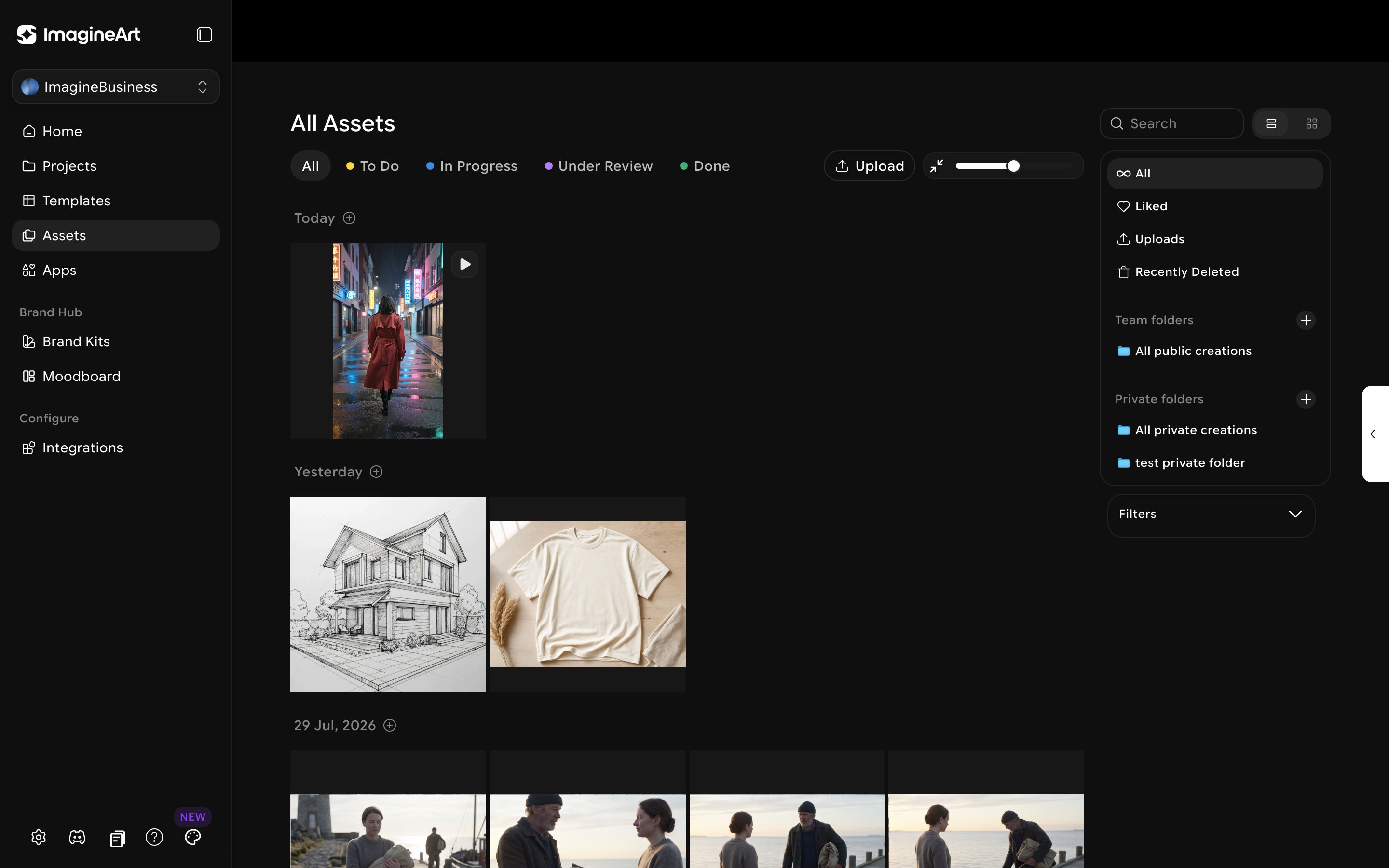 Use the status filters as a lightweight review pipeline — move an asset from **To Do** to **Under Review** once a draft is ready, rather than relying on a separate project-management tool for creative approvals.
## Connecting your tools
Under **Configure → Integrations**, connect third-party tools your team already uses.
Use the status filters as a lightweight review pipeline — move an asset from **To Do** to **Under Review** once a draft is ready, rather than relying on a separate project-management tool for creative approvals.
## Connecting your tools
Under **Configure → Integrations**, connect third-party tools your team already uses.
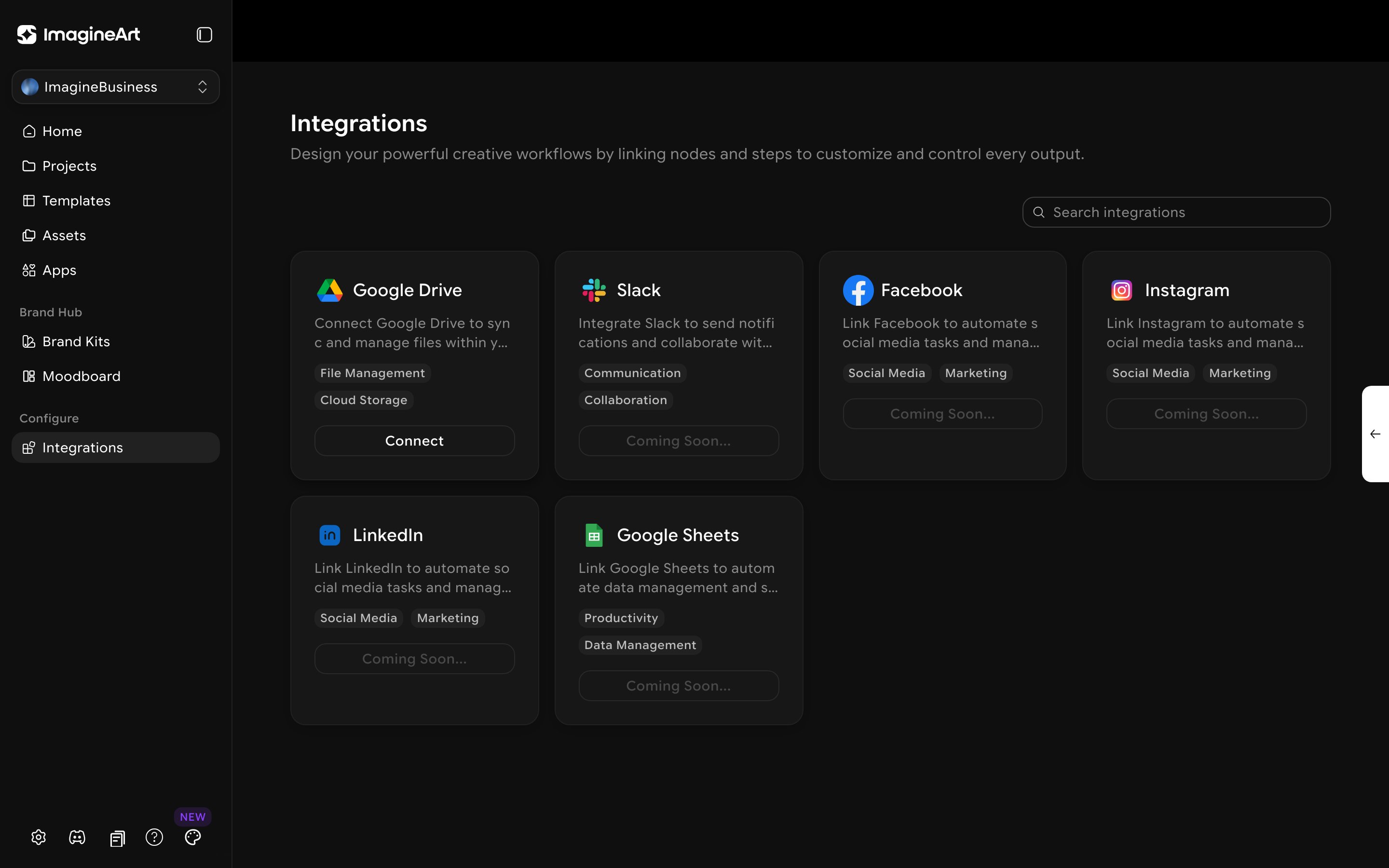 **Google Drive** is connectable today. Slack, Facebook, Instagram, LinkedIn, and Google Sheets are all listed as **Coming Soon** — plan around Google Drive for now if you need a working integration.
This documentation is built and hosted on [Mintlify](https://mintlify.com), a developer documentation platform.
**Google Drive** is connectable today. Slack, Facebook, Instagram, LinkedIn, and Google Sheets are all listed as **Coming Soon** — plan around Google Drive for now if you need a working integration.
This documentation is built and hosted on [Mintlify](https://mintlify.com), a developer documentation platform.